
Plan it once. It runs by itself, and only drafts.
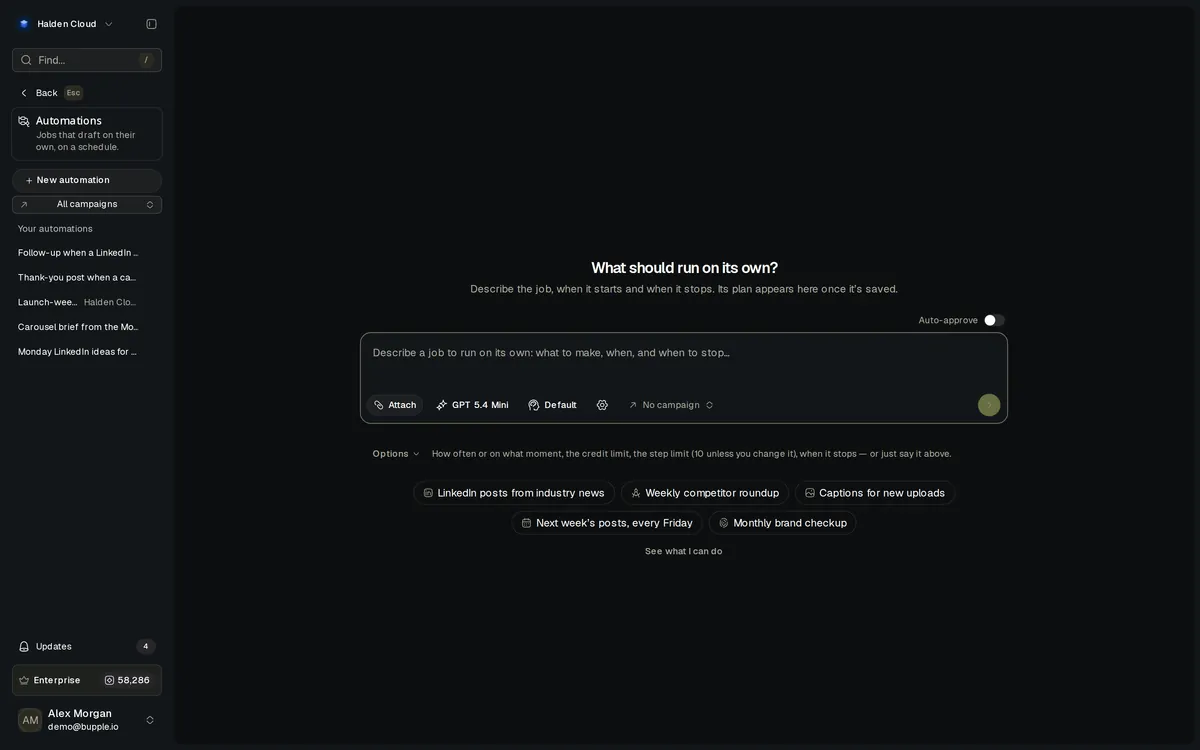
Automations are content jobs you plan in plain words with the Superagent. Each one runs by itself — on a schedule, or when something happens in your brand — and makes drafts for your team to check. It never publishes on its own.
Drafts only
It never publishes on its own
15
Events that can start a run
10 steps
Per run unless you change it
Test run
See the result and cost first
How it's built
One plan. Run by the Superagent, step by step.
You say what should happen again and again. The Superagent writes it up as a plan, and every run of that plan is its own conversation that you can open.
You describe it
In the Superagent chat or on the Automations page, say what to make, when it should run and when it should stop.
- Plain words, no flow chart
- A schedule or a moment
- In the brand you are in
The plan
The Superagent answers with the whole plan — the steps, when it runs, when it stops, what a good result looks like — and asks what only you decide.
- Skip or retry a failed step
- The most one run may spend
- When it stops by itself
The runs
Each run works through the steps with the tools that publish, schedule, send or change the brand taken away, and leaves its drafts for you.
- Every step logged
- Credits counted per run
- Drafts waiting for your team
The triggers
What can start a run.
A clock, or something that happens in the brand. Each moment starts one run, in the automation’s own brand.
A schedule
Every morning, every Friday, or “starting in 5 minutes, every 2 minutes, 3 times”.
A file is ready
A file lands in the library or in a folder — narrowed to a kind of file and where it came from.
A file has been studied
The run waits for the file’s study or transcript, so its drafts quote what the video shows and says.
A tag or a comment on a file
A tag is added to a file, or someone leaves a comment on one.
A post is published
From Bupple or straight on the network. The run is given the post — caption, files and link.
A post takes off
Or engagement drops, or a post passes a number you choose.
A goal or a milestone
A campaign reaches its goal, or followers pass a milestone.
A DM or a comment arrives
A new DM, or someone comments on a post. A reply it drafts waits for a person.
Another automation finishes
Chain them: a run starts with everything the other automation’s run produced.
The workflow
From one message to drafts every week.
Ask
Describe the job in the Superagent chat, or start from one of the ideas on the Automations page.
"Every Monday at 9, draft three LinkedIn post ideas for my brand."
The Superagent writes the plan
It lists the steps, when it runs and when it stops, and asks you three things: skip or retry a failed step, the credit limit per run, and the end.
Retry once · 200 credits a run · Ends after 8 runs
Run a test
A test run shows what the automation drafts and what one run really costs, before anything is switched on.
Test run
Switch it on
It runs by itself on its schedule or its trigger. Pause it, run it now, end it or change the plan from its menu.
Save and switch on
Your team checks the drafts
Each run lists its steps, the credits it spent and what it made. You get an Update when a run finishes, needs you or does not finish.
"Needs you: which of the two product names should the posts use?"
What it does
Full capabilities
Planned in the chat
Say it in plain words. The Superagent writes the plan and never picks the failure rule, the credit limit or the end for you.
A credit limit per run
Each run is checked against its limit before every step and every picture or video, and stops at its limit.
A step limit you set
Ten steps unless you change it, up to fifty. Two to four is usual.
Checks its own work
Each draft is reviewed against the plan’s good result; one that falls short is rewritten once, and one that still does is flagged.
Asks when it is stuck
A decision only you can make stops the run as Needs you. Answer in its chat and the run picks up where it stopped.
Remembers earlier runs
Each run is told what earlier runs drafted, so it does not repeat a topic.
No overall time limit
A run waits for a long video to finish, then goes on with the file.
Drafts only
An automation never publishes, schedules, sends or changes the brand. A reply to a DM or comment waits for a person to approve it.
Built for every team
One plan. Different teams.
Marketing teams, agencies, social and content teams hand the repeat work to automations, each in their own brands.
Next week’s posts, every Friday.
Ask once for next week’s post drafts. Every Friday the automation drafts them and your team checks them on Monday.
How it runs
Describe the weekly job
Set the credit limit and the end
Run a test
Switch it on
Drafts waiting every Friday
Every brand keeps its own routine.
An automation belongs to one brand and runs only on what happens in it, so each client’s routine stays with that client.
How it runs
Switch to the client's brand
Plan the automation
It reads that Brand Kit
Only that brand’s moments start it
Drafts for that brand
One post live, the rest drafted.
When a post is published, an automation drafts versions for the brand’s other networks, ready for your team to check.
How it runs
A post is published
The run is given the post
It drafts for the other networks
Each draft checks itself
Your team approves
Captions for every new upload.
Upload a video and an automation drafts its captions from what the video actually shows and says.
How it runs
Upload a video
The run waits for its study
It drafts the captions
Drafts saved with the run
Your team picks one
The shift
This is what changes.
Before
With Automations
Remember to write the weekly posts every Friday
An automation drafts them every Friday.
Build a flow chart in a separate tool
Describe it in the chat. The Superagent writes the plan.
Rewrite each published post for the other networks by hand
A post going live starts the drafts for the others.
Worry that a bot will post something on its own
Automations only draft. A person publishes.
Find out what a job cost at the end of the month
Each run has a credit limit and lists what it spent.
Less switching
Fewer reminders. One plan.
Routine content work you used to start by hand runs by itself, inside the brand it is for.
A calendar reminder to write posts
A schedule that drafts them
A separate automation tool
A plan written in the chat
Copying a post to every network
Drafts when a post is published
Checking every new upload
A run for every new file
Watching the numbers for a spike
A run when a post takes off
Guessing what a job will cost
A test run and a credit limit
Connections
How Automations fit the platform
An automation runs on the Superagent and reaches the rest of Bupple the same way the chat does — only to draft.
Superagent
Every automation is planned in the chat, and every run is its own conversation
Media Library
A file added, studied, tagged or commented on can start a run
Media Library
Pictures, videos and sound a run makes are saved there
Posts
A post published from Bupple or outside it can start a run
Analytics
A post taking off, engagement dropping or a number passed can start a run
Inbox
A new DM or comment can start a run; its reply waits for a person
Campaigns
A campaign reaching its goal can start a run
Imagine
A run can make pictures, videos and sound, each checked against its credits
Drafts only
Publishing, scheduling and sending stay with a person.
A limit on every run
A run stops before a step or a picture its remaining credits cannot pay for.
A test before it starts
Run a test, see the drafts and the cost, then switch it on.
FAQ
Common questions
Can an automation publish for me?
No. Automations make drafts — posts, pictures, videos, notes. Publishing, scheduling and sending stay with a person.
What can start an automation?
A schedule, or something happening in the brand: a file added, studied, tagged or commented on, a post published from Bupple or outside it, a post taking off, engagement dropping, a campaign goal reached, followers passing a milestone, a post passing a number, a DM or comment arriving, or another automation finishing a run.
How do I control what it spends?
Every automation has a credit limit per run and a step limit. A run stops before a step it cannot pay for, and you can pause it any time.
Do I need to build a flow chart?
No. You describe it in the Superagent chat and it writes the plan for you to check.
What happens when a run gets stuck?
If a step needs a decision only you can make, the run stops as Needs you, spends nothing more and sends you an Update. Answer in its chat and it carries on.
Let the routine work run itself.
Plan it in one message. Approve what it drafts.
No credit card required · Cancel anytime