
One launch. A goal, a budget and a memory.
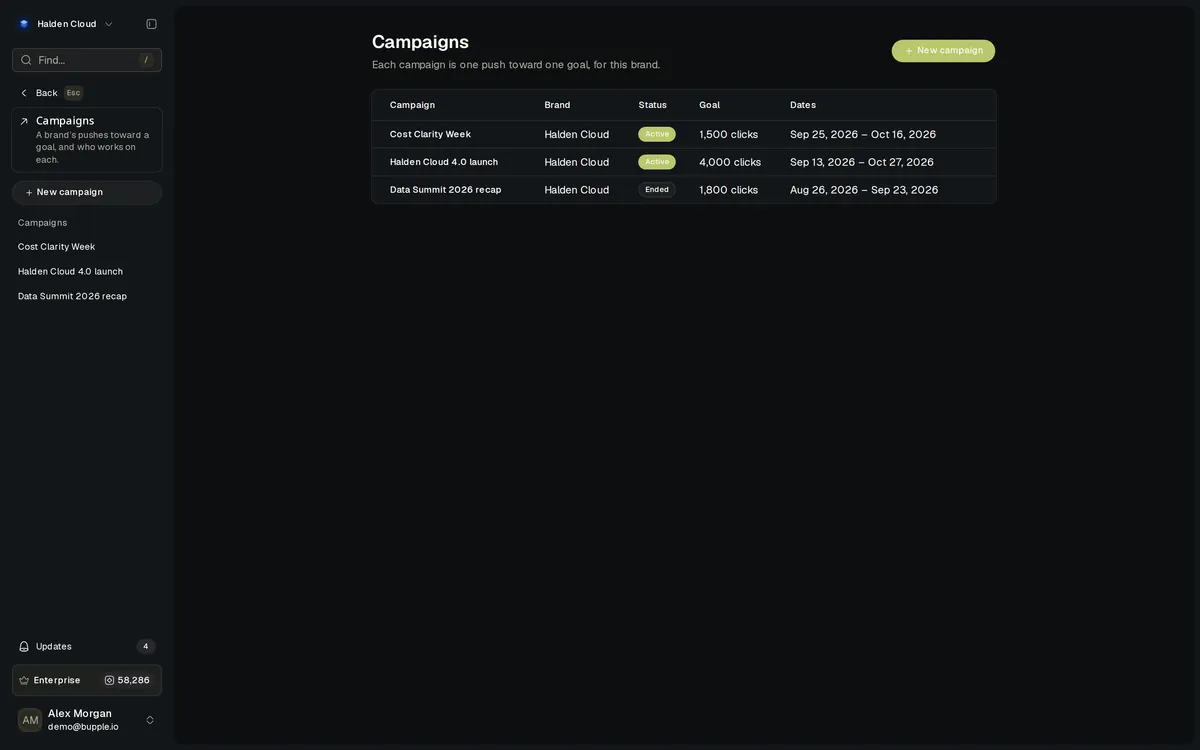
Campaigns give each launch a brief, dates, up to five goals and a credit limit. Superagent chats and automations in a campaign follow its memory, the paid work made in it counts against its budget, and its posts report against its goals.
5
Goals per campaign
Stop or warn
At its credit limit
Per network
Tracked short links
Every week
It learns what worked
How it's built
One campaign. Everything in it follows it.
A campaign sits inside a brand. Its chats and automation runs read its memory on top of the Brand Kit, paid work made in it spends from its budget, and its posts count toward its goals.
You set the brief
Brief, start and end dates, a posting rhythm per network, plain-text stop rules, goals and a credit limit — on the Campaigns page or by asking the Superagent.
- A brief and dates
- Up to five goals
- A credit limit
The campaign
Holds the memory its work follows, counts what that work spends, and keeps the members who may work on it.
- A memory on top of the brand
- Spend against its limit
- Members and campaign roles
The work
Chats, automations, posts, Video Editor videos, Imagine generations and files are put in the campaign where they are made.
- Picked where it is made
- Listed on the campaign page
- Results against each goal
In a campaign
The work a campaign holds.
Pick the campaign where you make the work. Only campaigns you may add content to are offered.
Superagent chats
A chat in a campaign follows its memory, and its spend counts against the campaign.
Automations
Every run follows the campaign’s memory and spends from its budget.
Posts
Pick the campaign in the post composer; its links go out as tracked short links.
Video Editor videos
Pick the campaign on the New video form; the video counts against its limit.
Imagine generations
Make a picture, video or sound in the campaign and find it there afterwards.
Media Library files
Set a file’s campaign in its details panel, and filter the Media Library to one campaign.
The workflow
From a brief to results against the goal.
Start a campaign
On the Campaigns page, or by asking the Superagent. It asks you first, then makes the campaign with only what you said.
"Start a campaign called Fall Launch starting Oct 20."
Set its goals and its limit
Choose up to five goals, reached when all are met or when any one is, and a credit limit that stops spending or only warns.
3,000 impressions · 300 clicks · Stop spending at the limit
Fill its memory
Audience, voice, what every piece must include and avoid, hashtags and calls to action. Fill it from the brand in one press; every save is a version.
Fill from brand
Put the work in it
Pick the campaign where you make a post, a chat, an automation, a Video Editor video or an Imagine generation, or tag a file in Media Library.
"Draft three launch posts for this campaign."
Follow the results
The campaign page lists everything in it, its spend against the limit and its results against each goal.
On track · At risk · Reached
What it does
Full capabilities
A brief your team works from
Brief, start and end dates, a posting rhythm per network and plain-text stop rules, on one campaign page.
Up to five goals
Clicks, impressions, reach, engagements, views, followers, likes or conversions. Reached when all are met, or when any one is.
A credit limit that holds
Choose “Stop spending at the limit” or “Only warn me”. Set to warn, managers hear at 80% and at 100%. The page shows what has been spent.
A memory on top of the brand
Every chat and automation run in the campaign follows it. Every save is a version you can restore.
Tracked links, per network
Links in a campaign’s posts go out as short links, one per network, with UTM tags added unless a link has its own. Clicks are counted in its results.
Members and campaign roles
Add teammates with a campaign role — Sign off, Create, Review or View only to start. The workspace renames them or adds its own.
Hears about its goal
The brand hears when a campaign reaches 50%, 80% and 100% of its goal.
Learns every week
Each week the campaign learns what worked from its own posts’ results.
Built for every team
One campaign. Different teams.
Marketing teams, agencies, social and content teams run a launch the same way, each in their own brands.
A launch with a goal and a budget.
Give the launch its dates, goals and credit limit, and see where it stands against each goal as it runs.
How it runs
Start the campaign
Set goals and the limit
Put the work in it
Spend counted as you go
Results against each goal
One client, one push, one budget.
A campaign sits in the client’s brand, with its own members and a credit limit that stops spending or only warns.
How it runs
Switch to the client's brand
Start the campaign
Add the members who work on it
Set the credit limit
Set to warn, managers hear at 80%
Every link counted, per network.
Links in a campaign’s posts go out as tracked short links, one per network, and the clicks count toward its goals.
How it runs
Pick the campaign in the composer
Publish the post
Links become short links
Clicks are counted
Results update the goal
One voice for the whole launch.
Fill the campaign’s memory from the brand, adjust it, and every chat and automation in the campaign follows it.
How it runs
Fill from brand
Adjust audience and voice
Save the memory
Chats in the campaign follow it
Restore an older version any time
The shift
This is what changes.
Before
With Campaigns
A brief in a doc nobody opens again
A brief and a memory every chat and automation follows.
Find out the launch overspent after it ended
A credit limit that stops spending or warns at 80% and 100%.
Tag every link with UTM codes by hand
Tracked short links per network, UTM tags added.
Pull numbers into a spreadsheet to see the goal
Results against each goal on the campaign page.
Hunt for the launch’s files across folders
Filter the Media Library to one campaign.
Less switching
Fewer spreadsheets. One campaign page.
What you used to keep across docs, sheets and link tools lives on the campaign, beside the work.
A brief in a shared doc
A brief on the campaign page
A budget tracker in a sheet
A credit limit that holds
A separate link shortener
Tracked short links per network
A goal tracker by hand
Results against each goal
Re-explaining the launch voice
A memory its work follows
A list of who works on what
Members with campaign roles
Connections
How Campaigns fit the platform
A campaign is picked where the work is made, and read where its results are counted.
Superagent
Ask it to start a campaign; its chats follow the campaign memory
Brand Kit
Fill the campaign’s memory from the brand in one press
Posts
Pick the campaign in the composer; its links are tracked per network
Video Editor
Make a video in the campaign; it counts against its limit
Imagine
Make a generation in the campaign
Media Library
Set a file’s campaign, and filter the library to one campaign
Automations
An automation can run in a campaign, or start when it reaches its goal
Analytics
Its results are read from your posts’ and accounts’ numbers
On track, at risk or reached
With an end date, each goal and the whole campaign say where they stand.
A limit that holds
A campaign set to stop refuses its next paid step once the limit is spent.
One memory for the launch
Every chat and automation run in the campaign follows it on top of the brand.
FAQ
Common questions
What counts against a campaign’s credit limit?
The credits its chats and automation runs spend, including the pictures they make, plus Video Editor videos and Imagine generations made in the campaign. A campaign set to stop refuses its next paid step once the limit is spent.
Who can see a campaign?
The workspace’s owners and admins see every campaign of the brand. Everybody else sees the campaigns they are a member of.
Can I set a conversions goal?
You can set one, but Bupple does not measure conversions yet, and the Results card says so. Every other measure is read from your posts’ and accounts’ numbers.
What is in a campaign’s memory?
Its audience, voice, what to include and avoid, hashtags and calls to action. Every chat and automation in the campaign follows it on top of the brand, and each week it learns what worked from the campaign’s own posts.
Can the Superagent start a campaign for me?
Yes. Ask it in the chat. It asks you first, unless Auto-approve is on, then makes the campaign with only what you said and puts that chat in it.
The Platform
Everything works together.
Run your next launch as a campaign.
Goals, budget and memory in one place.
No credit card required · Cancel anytime